Mozilla Firefox is one of the popular free and open-source web browser developed by Mozilla Foundation and its subsidiary, Mozilla Corporation. Firefox is available for Windows, macOS and Linux operating systems. Its sibling, Firefox for Android, is available for Android. Firefox uses the Gecko layout engine to render web pages, which implements current and anticipated web standards.
Firefox Beta channel will provide early access to features that are going to be available in next immediate stable release... If you want to enjoy the features before anyone... Here I'm going to show you how to install Firefox Beta in Ubuntu.
Mozilla maintaining official Firefox Beta ppa for Ubuntu... We can use it to install Beta Version Of Firefox in Ubuntu.. Just run the below lines to add PPA.
Warning : Since Firefox's this PPA provides a beta Firefox version, you may find bugs. If you do, kindly report them at https://bugs.launchpad.net/~mozillateam
That's all for now... You can enjoy new features of Firefox... Happy Browsing...
How To Enable/Disable JavaScript In Your Web Browser
JavaScript is a standard programming language that can be included in web pages to provide functionality such as menus, sounds, and other interactive features. By default, Firefox enables the use of JavaScript and requires no additional installation.
Do you have to disable JavaScript, for some reason(see, Why do people disable JavaScript
)?
Here is the step-by-step instructions for disabling JavaScript in your browsers. By the way, Java and JavaScript are two different things, so make sure that you're looking at the correct language.
TIP : If you're a web developer, you are adding JavaScript to your pages, it's a good idea to view your pages with JavaScript disabled, so you can get an idea what users without JavaScript enabled browsers would see.
WARNING : Please note that you may loose some of the web page functionality by disabling JavaScript.
Disable JavaScript In Firefox
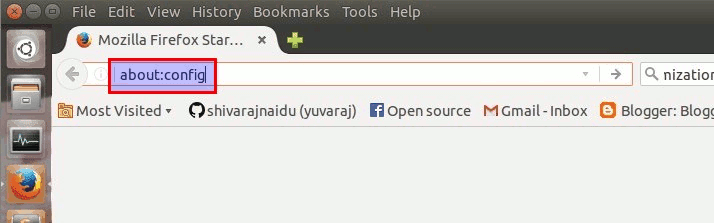
Step 1 :
Type about:config in your location bar and press "ENTER" button..
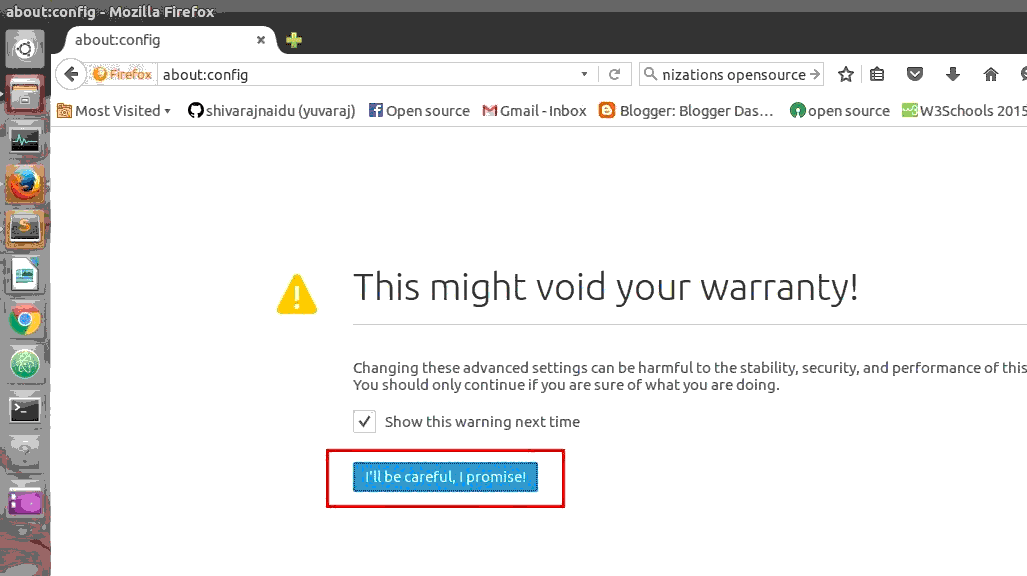
Step 2 :
Now confirm the warning message..
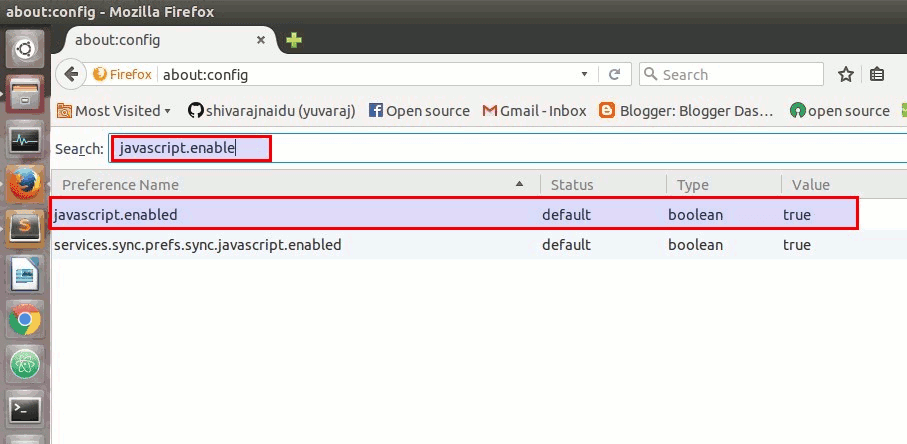
Step 3 :
Now , type "javascript.enabled" in search box..
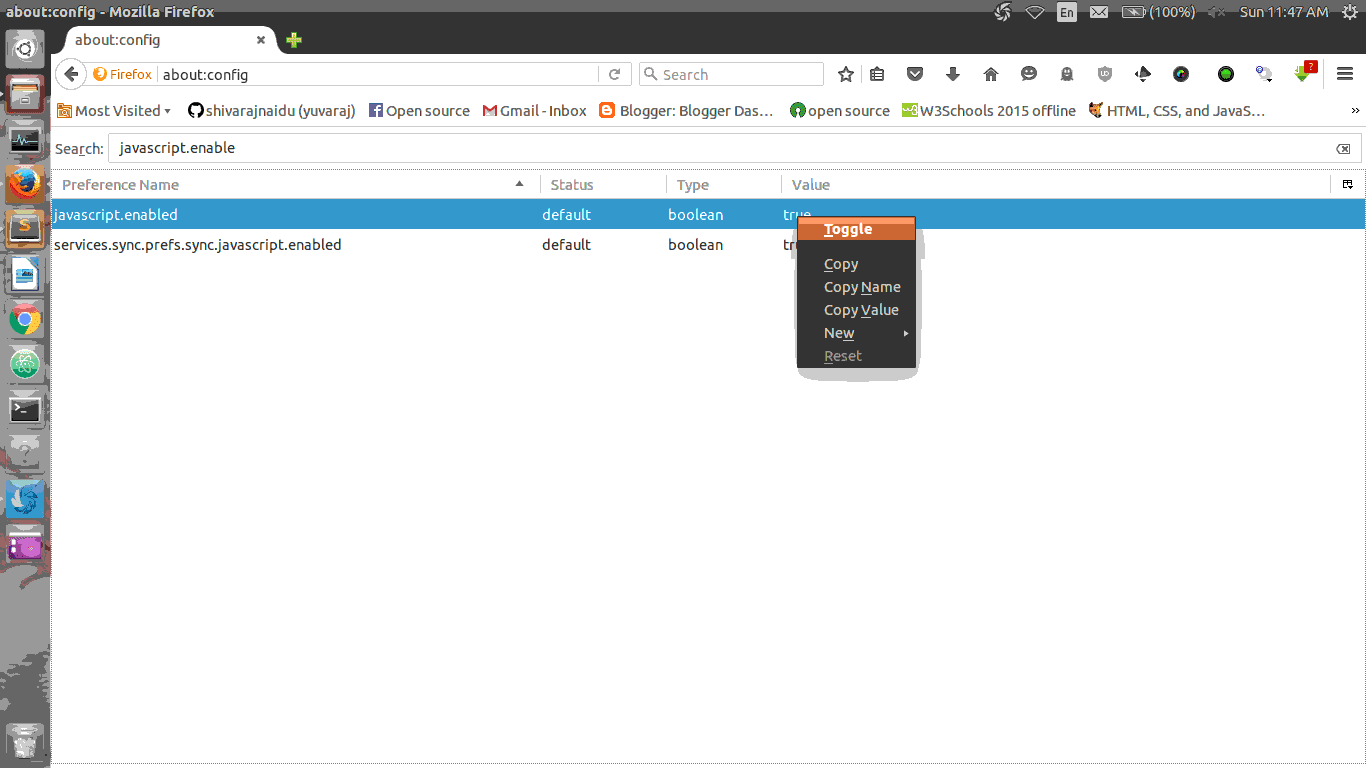
Now change the value of javascript.enabled to false (The default value is "true".. to change it to "false", Right click on it and select toggle option.)
To enable it again, toggle the value back to its default value.. (i.e) set the value as "true"
Disable JavaScript In Google Chrome
Step 1 :
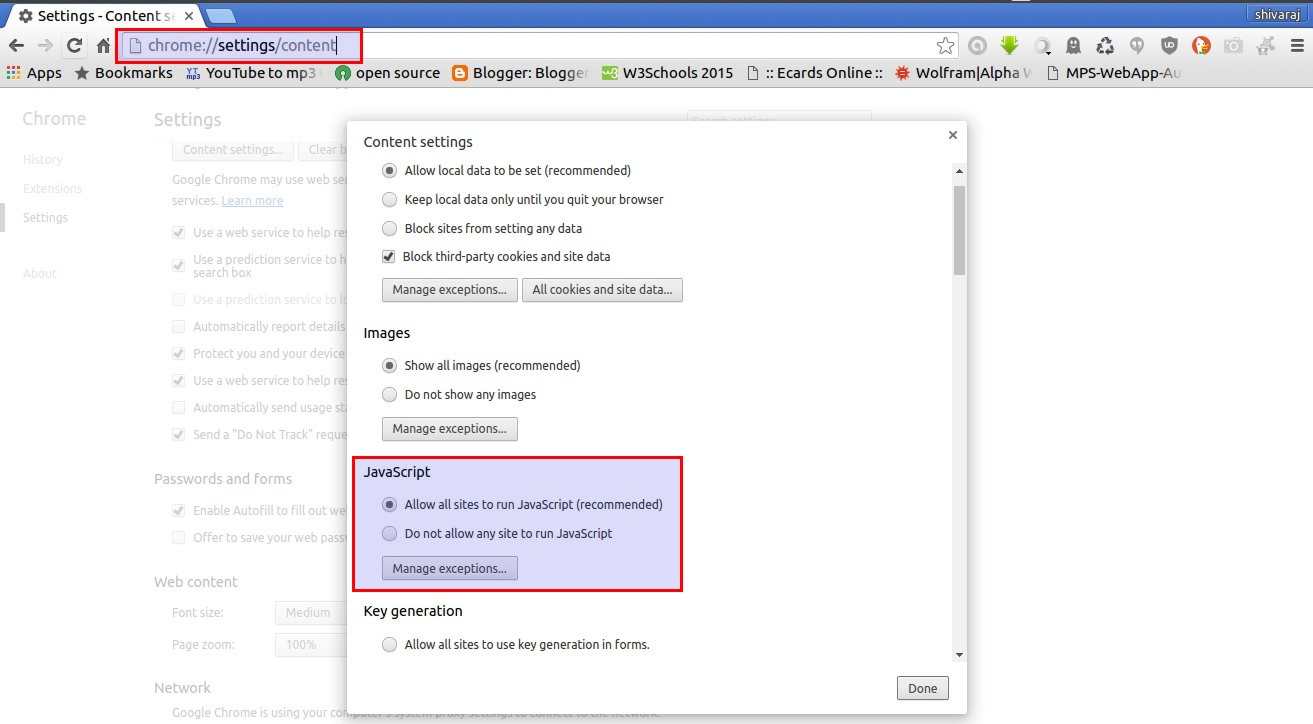
Open Browser Settings and then goto content options(through advace settings).. or (You can also directly access content settings simply , type chrome:settings/content in location bar and press "ENTER" button..) Then look at there for javascript options..
Step 2 :
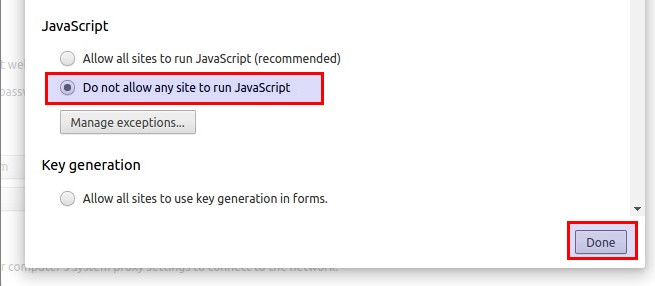
To disable JavaScript in your chrome browser.. Check the radio button named "Do Not Allow Any Site To Run JavaScript"
Disable JavaScript In Opera Browser
Step 1 :
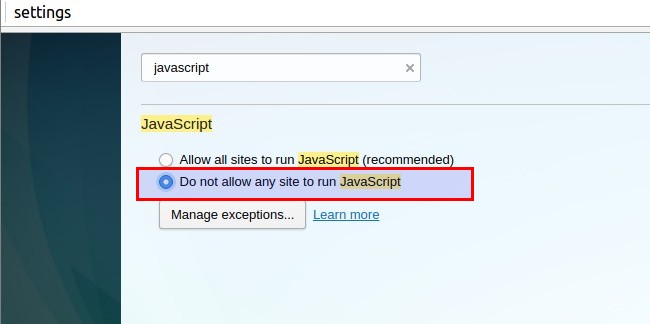
Open Browser Settings (You can also directly access browser settings simply , type chrome:settings in location bar and press "ENTER" button..) and then Type "javascript" in search box present in settings window..
Step 2 :
To disable JavaScript in your Opera web browser.. Check the radio button named "Do Not Allow Any Site To Run JavaScript"
Enable/Disable Backspace as 'Go Back' Shortcut in Firefox
In Firefox on Windows operating system, if you press the `backspace` key, it will take you one page back from current web page, an action that similar to when the both Firefox and IE browser's "Back" button, while `Shift+Backspace` will go forward. The backspace key is mapped to "Back" function in Firefox for Windows is for consistency with Internet Explorer.
On the other hand, Firefox in Linux by default does not map the backspace key to "Go Back" function to improve consistency with other applications running on Linux. Instead, the page will scroll up or down (when pressing Shift+Backspace key together).
The backspace as Back button feature can be easily turned on or off depending on user preference. Thus, Firefox for Windows users can disable the back function mapping to backspace key, and Firefox for Linux can enable the backspace to map to Back function easily, by using the following Firefox preference.
Step 1 :
Type about:config and then press Enter key in Firefox Location Box..
And then confirm the warning message.
Step 2 :
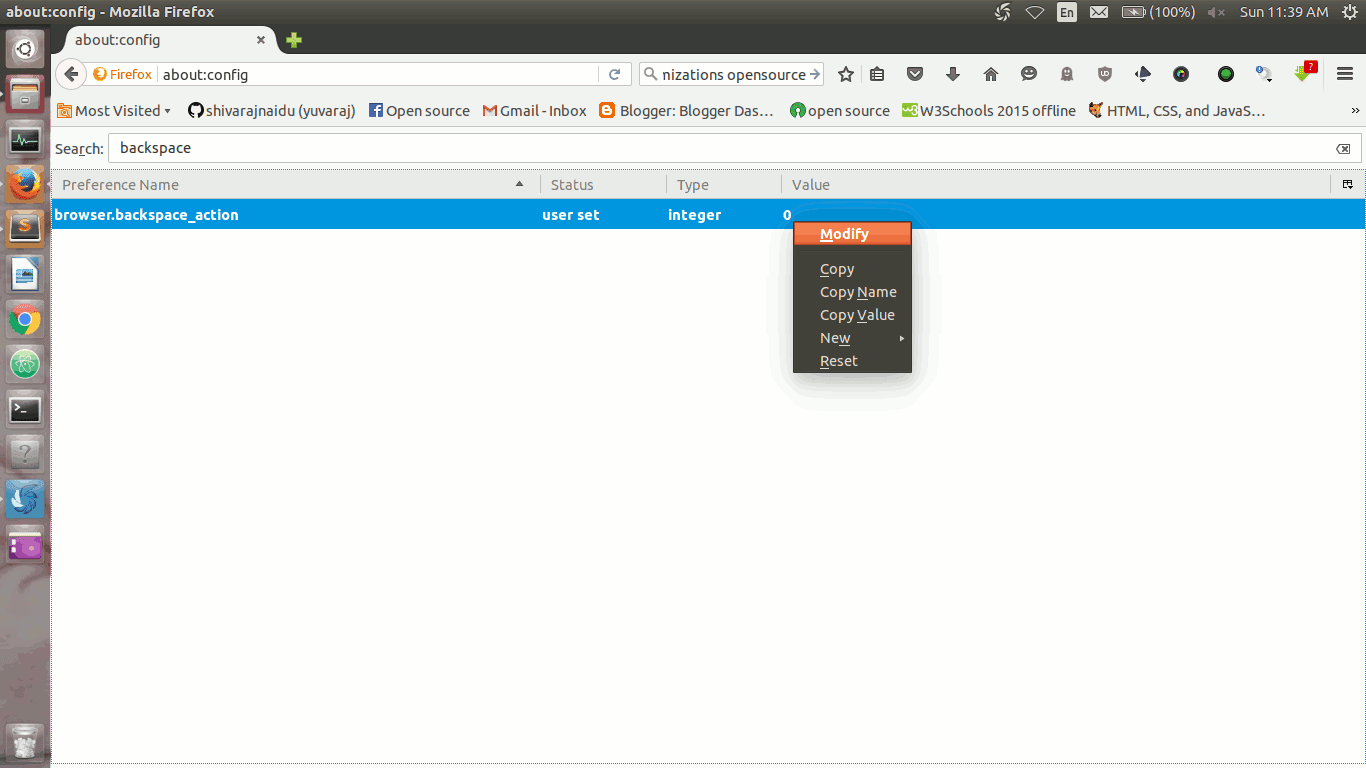
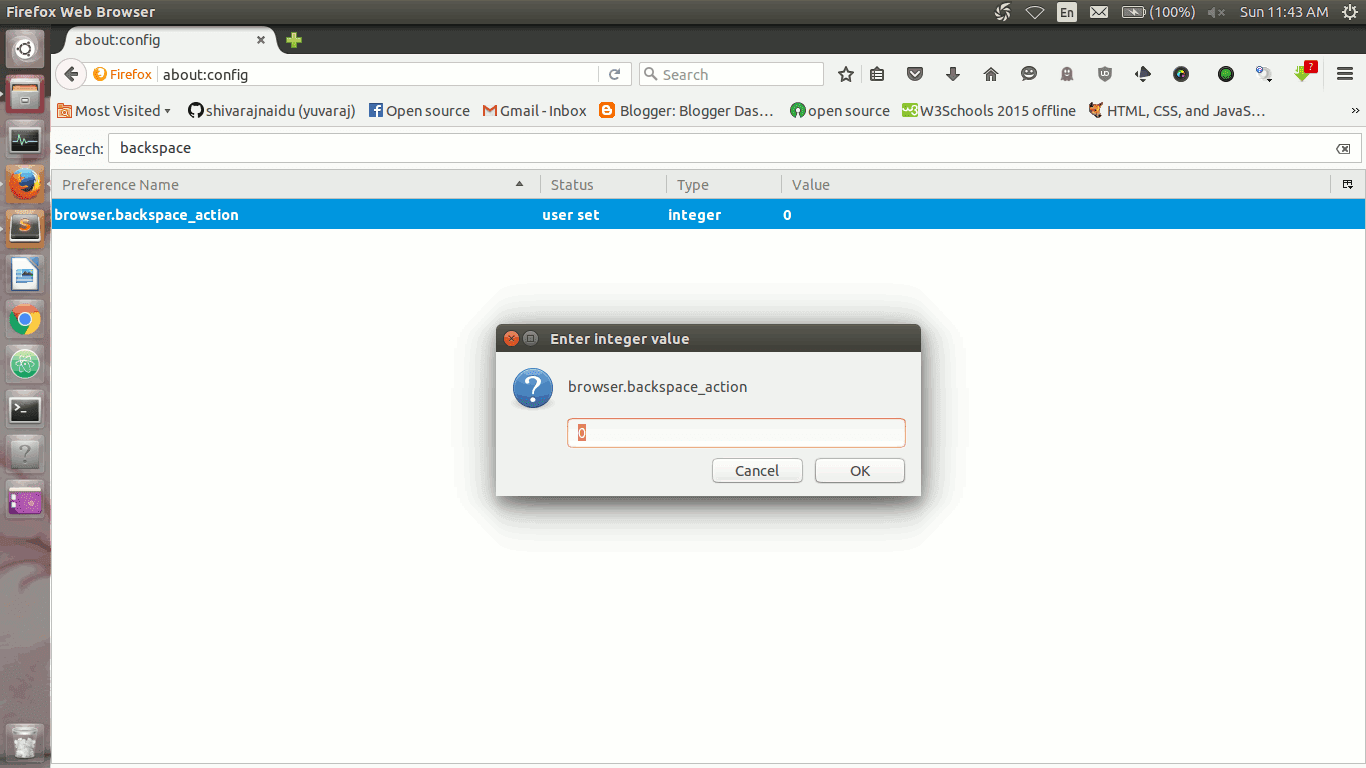
Then type "backspace" in search bar and locate the following preference name: browser.backspace_action
Right click on it ,select "Modify" option
and change the browser.backspace_action value to one of the following values (as per your need):
Set value as 0: If you want to set backspace key as 'Go Back' short cut. (Default in Windows)
Set value as 2: If you want disable Backspace as shortcut for 'Go Back' . (Default in Linux)
Some Awesome Opensource Web Browsers... Worth to Try... (part 3)
11 rekonq
rekonq is a lightweight, QtWebKit-based web browser developed inside the free software project KDE. It is the default web browser of Chakra GNU/Linux.
rekonq aims to be a standalone and simple web browser. Its code was initially based on Qt Development Frameworks' QtDemoBrowser and is developed on KDE Projects' Git repository.
Available platforms
Windows
Linux
Features
rekonq integrates into the KDE desktop, e.g. downloading files through KDE download system, sharing bookmarks with Konqueror, KIO support, etc. rekonq possesses most of the features of a modern web browser, specifically:
Brave is an opensource web browser developed by Brendan Eich , Mozilla co-founder and Creator of Java Script Programing language.
It aims to block website trackers and remove intrusive internet advertisements, and replaces them with ads sold by Eich's company. The browser also strives to improve online privacy by sharing less data with advertising customers, targeting web ads through anonymized analysis of their browsing history instead. Brave also intends to pay 15% of the ad revenue to the browser users, which they can in turn donate to bloggers and other providers of web content through micropayments. As of 2016, it is currently in version 0.7(beta).
Available platforms
Windows
Linux
OS X
Android
iOS
Features
Tabbed browsing
Content Blocking and Add blocking (by Default)
Better Privacy
Resource Friendly
Faster web page loading
Download links :
You can download Brave for Android ,iOS ,Windows and for OS X on official website of Brave Browser or You can download and test the latest version from git hub page. official link : Brave software Github page : Git repository of Brave Browser
Pale Moon is a free and open-source web browser based on Mozilla Firefox, available for Linux, Windows, and Android, developed and distributed by Dutch developer M.C. Straver. Pale Moon is a fork of Firefox, retaining the fully customizable user interface as seen in the previous era (4-28) of the Firefox browser, and focusing on the core tasks of web browsing. Pale Moon 26, uses the new web browser engine, Goanna , which is a fork of Gecko, the web browser engine of Firefox.
Because it is a fork of Firefox, Pale Moon is compatible with most (but not all) of the available Firefox extensions and plugins.
Available platforms
Windows
Linux
Android
Features
Adds 64-bit computing support and hardware acceleration
Uses a user interface similar to the one Firefox 28 and earlier used
Support for firefox extensions(not all)
Exposes additional configuration options such as scrolling, status, and new features specific to this browser
Functional status bar and more freedom in customization
Offers a personalizable start page in cooperation with start.me
Supports Pale Moon-exclusive extensions and themes (e.g. Adblock Latitude)
Uses the IP-API
service instead of Google's for geolocation
Uses DuckDuckGo instead of Google or Yahoo! as the default search engine
Dooble is a free and open source Web browser. Dooble was created to improve privacy. Dooble uses Qt for its user interface and abstraction from the operating system and processor architecture. As a result, Dooble should be portable to any system that supports OpenSSL, POSIX threads, Qt, SQLite, and other libraries.
Web (originally called Epiphany from 2003 to 2012) is a free software web browser for the GNOME desktop environment.
The browser was forked from Galeon, after developers' disagreements about Galeon's growing complexity. Since then Web has been developed as part of the GNOME project and uses most of GNOME's technology and settings when applicable. It is part of the GNOME Core Applications. As required by the GNOME Human Interface Guidelines (HIG), Web maintains the clean and simple graphical user interface with only a required minimum number of features exposed to users by default. The browser's functionality and configurability can be extended with official and third-party extensions.
Web's source code is available under the GNU General Public License from the GNOME project. The binary builds of the browser are available in the package repositories of most Linux distributions and BSD releases.
Can you spread the word? Privacy Awerness Video By Mozilla - Episode 1
Hello,
I
wanted to share a new video created by Mozilla that's already been
viewed more than 350,000 times(on mozilla website ) since it released .
The
video is designed for people who are new to the privacy discussion
and helps explain why we should all care about our right to privacy.
The more people we can reach, the greater our power to create change.
Can
you share it with your friends and family?
This is
the first video in a multi-part series about encryption - you can
read more about that below.
More soon --
------------------------------
Hello,
We can move more people from simply consuming the Web to
becoming its active citizens, but we need your help. People
like you and I know how fundamental privacy is to the open Web.
There are many more who share our values and would join this
movement. That's why we made something to spotlight the importance
of online privacy. We're creating videos for you to watch and then
share with friends, family, and colleagues. The videos are
designed to be an introduction to the issues we care about - a
way for each of us to start important conversations.
Why do this
now? We expect there are a number of significant political battles on
surveillance and encryption coming down the pipe. We're going to
need to ask people like you and your friends to take a stand. Before
we do this, we want to provide a solid grounding on why encryption
matters.
P.S.
This is a new campaign strategy for us and we will learn a lot as the
weeks go on. We'd love to hear your feedback - after
watching the video, you can reply to this email and let us know what
you think. Or send an email to askjoin@mozilla.org.
Firefox 45 Beta Released ♥ See What Is New in FF45 ♥
The latest update of Firefox 45 Beta
is now available for download and testing with lot of new features
and bugfixes.
This update includes
GTK3 Integration for Linux and new Synced Tabs button in button bar
and more features for developers.
The official stable
version of Firefox 45 is planed to release on March 8 2015. Users who
are very curious and impatient to see and use new features of firefox
45 can download
Firefox 45 beta from official firefox beta channel.
The new features and fixes avilable in FireFox 45 are listed below.. look @ them.. :)
New In Firefox 45
Instant browser tab sharing through Hello
GTK3 integration (GNU/Linux only)
Synced Tabs button in button bar
Tabs synced via Firefox Accounts
from other devices are now shown in dropdown area of Awesome Bar
when searching
Introduce a new preference
(network.dns.blockDotOnion) to allow blocking .onion at
the DNS level
Inspector search now matches results from all content in the page, including subframes
Ability to filter snapshot output in memory tool
Support for diffing heap snapshots added to the memory tool
Added Negative url filtering for the network monitor
DOMContentLoaded and load events shown in the network monitor timelineList of animated properties and keyframes is now displayed when clicking on an animation in the animation-inspector’s timeline
Fine tune animations by changing the playback rate of animations in the animation-inspector's timeline
Firefox 44 Stable Officially Released Download and Install Now
Mozilla has officially released Firefox 44 for all supported operating systems.
Some new features have been introduced in both desktop and mobile versions including the new improved . Series of changes in were also implemented in the developer version of Firefox 44.
Windows users Can Download And Install Firefox 44 from Official Firefox Website
Note For Linux Users :Linux Users Can Install or Update Firefox 44 From Their Distributions Official Repositories(Depends upon the Linux Distribution that It may takes one or two days to land New Firefox on Official Repositories.)
To install or Update Firefox on Debian and Ubuntu based systems :
The Firefox team released Firefox 44 beta on 17 Jan 2016 . And now available for download and test.
The official final version of Firefox 44 is scheduled to release on 26 Jan 2016 for all supported platforms.
The open source browser company published a brief report about this beta release, which features a new Warning pages for Untrusted connections and WebM/VP9 video support on systems that don't support MP4/H.264 .
Some Awesome Opensource Web Browsers... Worth to Try... (part 2)
6 K-Meleon
K-Meleon is an extremely fast, customizable, lightweight web browser based on the Gecko layout engine developed by Mozilla which is also used by Firefox. K-Meleon is Free, Open Source software released under the GNU General Public License and is designed specifically for Microsoft Windows (Win32) operating systems.
Available platforms
Windows
Features
K-Meleon uses the native Windows API for user interface instead of Mozilla's cross-platform XML User Interface Language (XUL) layer, and as a result, is tightly integrated into the look and feel of the Windows desktop.
Konqueror is a free and open-source web browser and file manager that provides file viewer functionality for file systems such as local files, files on a remote FTP server and files in a disk image. It is a core part of the KDE Software Compilation. Konqueror is developed by volunteers and can run on most Unix-like operating systems and on Windows systems. Konqueror is licensed and distributed under the GNU General Public License version 2.
Available platforms
windows
Linux
Features
Webbrowsing using KHTML or KDEWebKit as rendering engines
File management using most of Dolphin's features (including version-control, service menus and the basic UI)
File management on ftp and sftp servers
Full featured FTP-client (you can split views to display local and remote folders and previews in the same window)
Embedded applications to preview files (e.g. Okular and Calligra for documents, Gwenview for pictures, KTextEditor for text-files)
Different kinds of plugins: Service-menus, KParts (embedded applications), KIO (accessing files using special protocols like http or ftp) and KPart-plugins (like AdBlocker...)
QupZilla is a new and very fast QtWebEngine browser. It aims to be a lightweight web browser available through all major platforms. This project has been originally started only for educational purposes. But from its start, QupZilla has grown into a feature-rich browser.
QupZilla has all standard functions you expect from a web browser. It includes bookmarks, history (both also in sidebar) and tabs. Above that, it has by default enabled blocking ads with a built-in AdBlock plugin.
Lynx is a highly configurable text-based web browser for use on cursor-addressable character cell terminals. As of 2015, it is the oldest web browser currently in general use and development, having started in 1992.
Links is an open source text and graphic web browser with a pull-down menu system. It renders complex pages, has partial HTML 4.0 support (including tables and frames and support for multiple character sets such as UTF-8), supports color and monochrome terminals and allows horizontal scrolling.
It is intended for users who want to retain many typical elements of graphical user interfaces (pop up windows, menus etc.) in a text-only environment.
Available platforms
Linux (Unix-like)
BSD
Windows
Features
Links runs on Linux, BSD, UNIX in general, OS/2, Cygwin under Windows, AtheOS, BeOS, FreeMint.
Easy and quick user control via pull-down menu in both text and graphics mode
Tables, frames in both graphics and text mode, builtin image display in graphics mode
Builtin image display for GIF, JPEG, PNG, XBM, TIFF in graphics mode
Anti-advertisement animation filter in animated GIFs
Automatic reconnection in case of TCP connection breakdown
Keepalive connections
Background (asynchronous) DNS lookup
48-bit high-quality image gamma correction, resampling and Floyd-Steinberg dithering in all color depths.
Easy installation, the browser is just one executable and no more files.
User-adjustable menu, HTML font size and image zoom factor.
Some Awesome Opensource Web Browsers... Worth to Try...
we all know that , how important world wide web is and how it integrated into our day to day life.
One of the key component of word wide web is, web browser. And , In general , an open source browser are always(at least for most cases..) richer and awesome than proprietary one. here , i am going to list ,some of open source browsers i knew... and worth trying...
Share Opensource Love ♥
1 Firefox
Firefox is a free, open-source web browser from Mozilla.
It offers numerous features and customization options. Its performance is excellent, and it's designed to protect your privacy.
and it is one of the most trusted web browser for security and privacy.
Chromium is the open-source web browser project from which Google Chrome draws its source code. The browsers share the majority of code and features, though there are some minor differences in features and they have different licensing.
GNU IceCat, formerly known as GNU IceWeasel, is a free software rebranding of the Mozilla Firefox web browser distributed by the GNU Project. It is compatible with Linux, Windows, Android and OS X.
The GNU Project attempts to keep IceCat in synchronization with upstream development of Firefox while removing all trademarked artwork. It also maintains a large list of free software plugins. In addition, it features a few security features not found in the mainline Firefox browser.
Midori is a lightweight web browser. It uses the WebKit rendering engine and the GTK+ 2 or GTK+ 3 interface. Midori is part of the Xfce desktop environment's Goodies component and was developed to follow the Xfce principle of "making the most out of available resources".
written in vala and C.
The SeaMonkey project is a community effort to develop the SeaMonkey all-in-one internet application suite. Such a software suite was previously made popular by Netscape and Mozilla, and the SeaMonkey project continues to develop and deliver high-quality updates to this concept. Containing an Internet browser, email & newsgroup client with an included web feed reader, HTML editor, IRC chat and web development tools, SeaMonkey is sure to appeal to advanced users, web developers and corporate users.
Under the hood, SeaMonkey uses much of the same Mozilla source code which powers such successful siblings as Firefox and Thunderbird. Legal backing is provided by the Mozilla Foundation.
NetSurf is a free, open source web browser. It is written in C and released under the GNU Public Licence version 2.
NetSurf has its own layout and rendering engine entirely written from scratch. It is small and capable of handling many of the web standards in use today.
Whether you want to check your webmail, read the news or post to discussion forums, NetSurf is your lightweight gateway to the world wide web. Actively developed, NetSurf is continually evolving and improving.
Short-cuts are very useful and convenient for our day to day computer use.....
and we are using different browsers(firefox, chrome, opera etc...), but they are all share some short-cuts commonly between them...
Each major web browser shares a large number of keyboard shortcuts in
common. Whether you’re using Mozilla Firefox, Google Chrome, Internet
Explorer, Apple Safari, or Opera – these keyboard shortcuts will work in
your browser.
Each browser also has some of its own, browser-specific shortcuts, but learning the ones they have in common will serve you well as you switch between different browsers and computers. This list includes a few mouse actions, too.
Tabs
Ctrl+1-8 – Switch to the specified tab, counting from the left.
Ctrl+9 – Switch to the last tab.
Ctrl+Tab – Switch to the next tab – in other words, the tab on the right. (Ctrl+Page Up also works, but not in Internet Explorer.)
Ctrl+Shift+Tab – Switch to the previous tab – in other words, the tab on the left. (Ctrl+Page Down also works, but not in Internet Explorer.)





 Hello,


