Showing posts with label google chrome. Show all posts

Tuesday, September 20, 2016

How To Remove Password From Password Protected PDF File Using Google Chrome

How To Remove Password From Password Protected PDF File Using Google Chrome

Portable Document Format (PDF) is one of the commonly used file formats in our day to day life... While it offers grade of security with optional password protection, there are times when we may need unsecured copy of password protected PDF file.
Here, we are going to see, how to achieve the above with the evergreen web browser Google Chrome (of course, we can do the same with Mozilla Firefox )

So, Before we start, you need to have Google Chrome installed in your system... (See, How To Install Google Chrome On Ubuntu Linux).

Step 1 :

Open your password protected PDF file either with Google Chrome or with Mozilla Firefox...
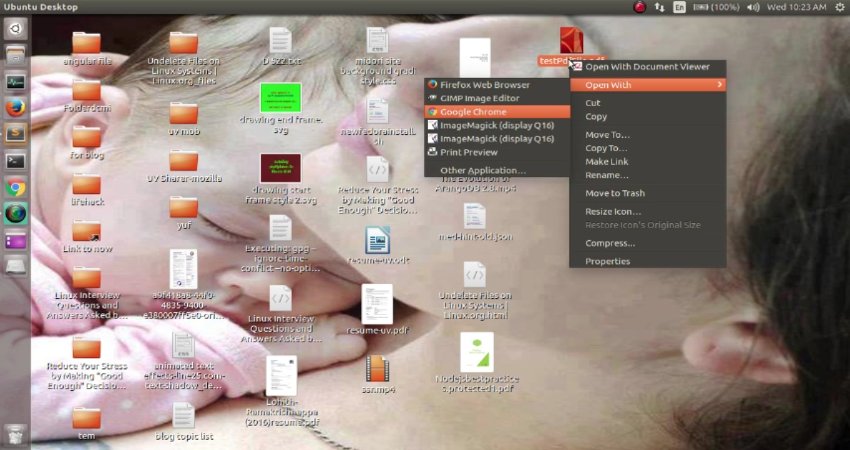
Step 2 :

It will ask you for password ... provide it..
After entering password the PDF will be displayed by your browser..
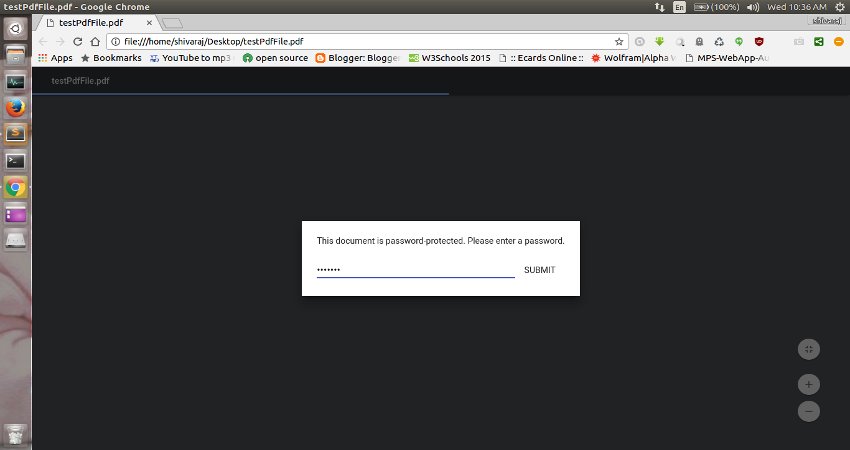
Step 3 :

Now, Press Ctrl + P on your keyboard or go to options and click on Print option..
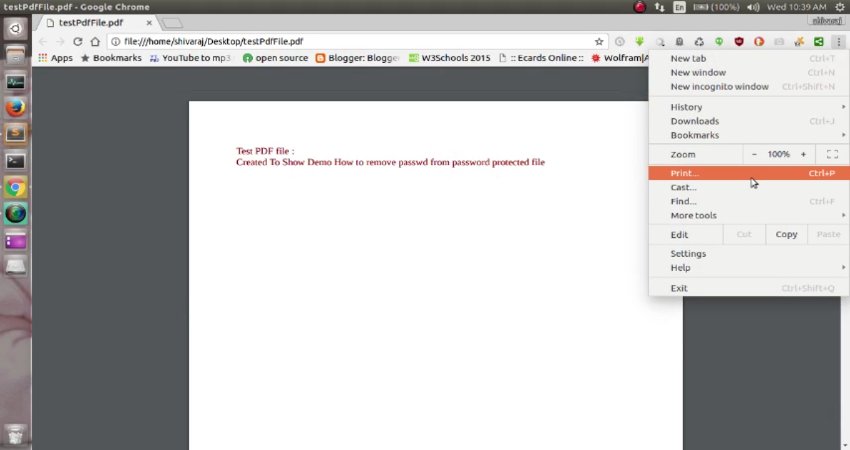
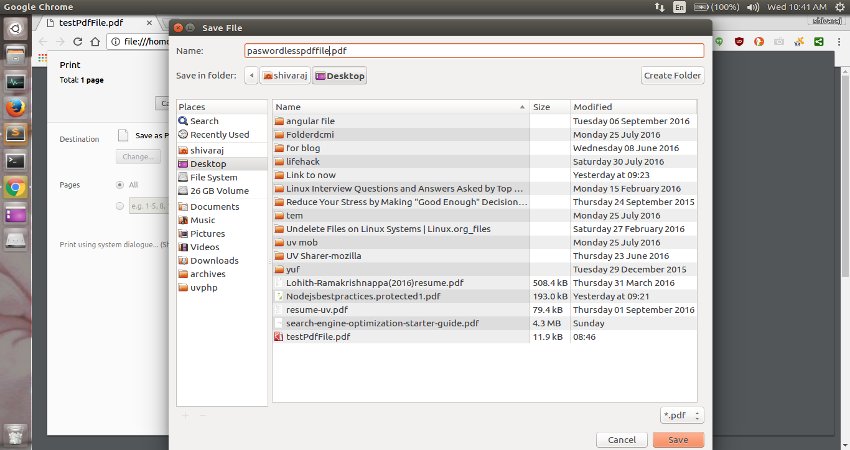
After you click on print option you will see dialog like shown below..
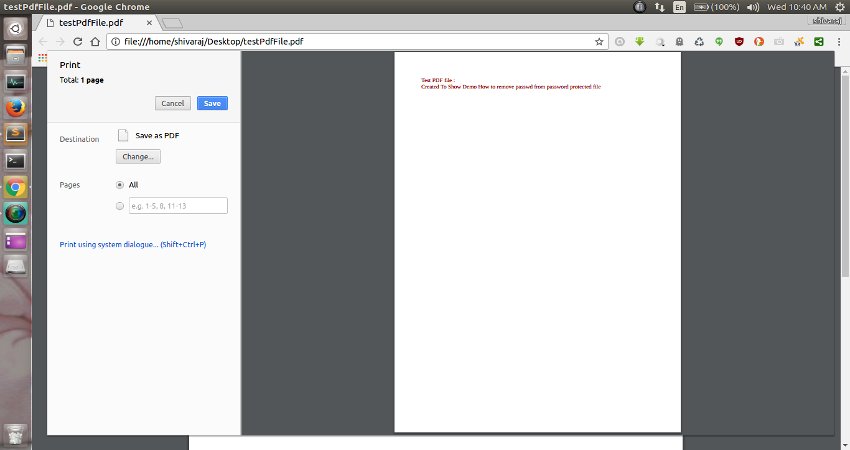
Step 4 :

Now click on Save button and Save the new copy of PDF file in somewhere else..
This new copy is password free ....

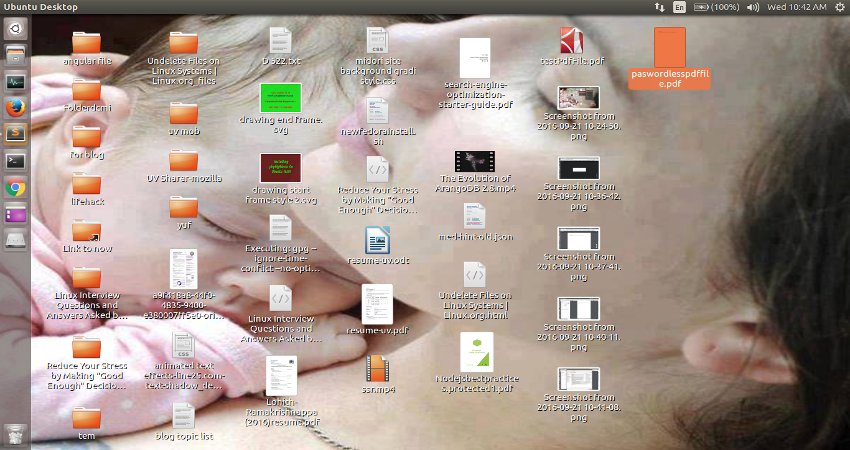
That's it ... Your new password less copy of PDF file is now ready...
Friends.. If you like this tip.. Do share this small trick on social media with your friends... You can follow more updates on our Facebook page


Here is the video for above tip...


Sunday, May 29, 2016

How To Enable/Disable JavaScript In Your Web Browser

How To Enable/Disable JavaScript
In Your Web Browser

JavaScript is a standard programming language that can be included in web pages to provide functionality such as menus, sounds, and other interactive features. By default, Firefox enables the use of JavaScript and requires no additional installation.

Do you have to disable JavaScript, for some reason(see, Why do people disable JavaScript )?
Here is the step-by-step instructions for disabling JavaScript in your browsers. By the way, Java and JavaScript are two different things, so make sure that you're looking at the correct language.

TIP : If you're a web developer, you are adding JavaScript to your pages, it's a good idea to view your pages with JavaScript disabled, so you can get an idea what users without JavaScript enabled browsers would see.


WARNING : Please note that you may loose some of the web page functionality by disabling JavaScript.

Disable JavaScript In Firefox

Step 1 :

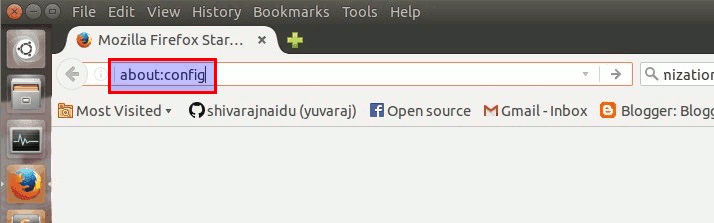
Type about:config in your location bar and press "ENTER" button..

Step 2 :

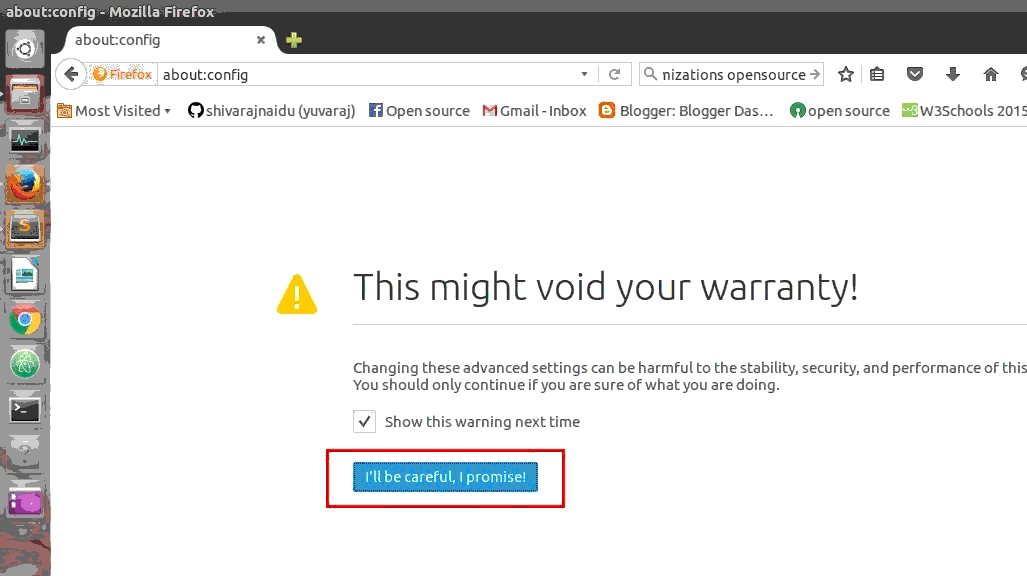
Now confirm the warning message..

Step 3 :

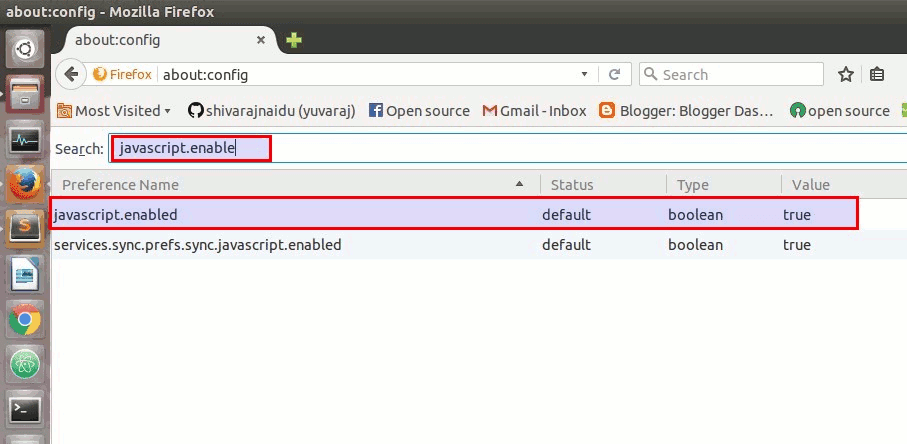
Now , type "javascript.enabled" in search box..

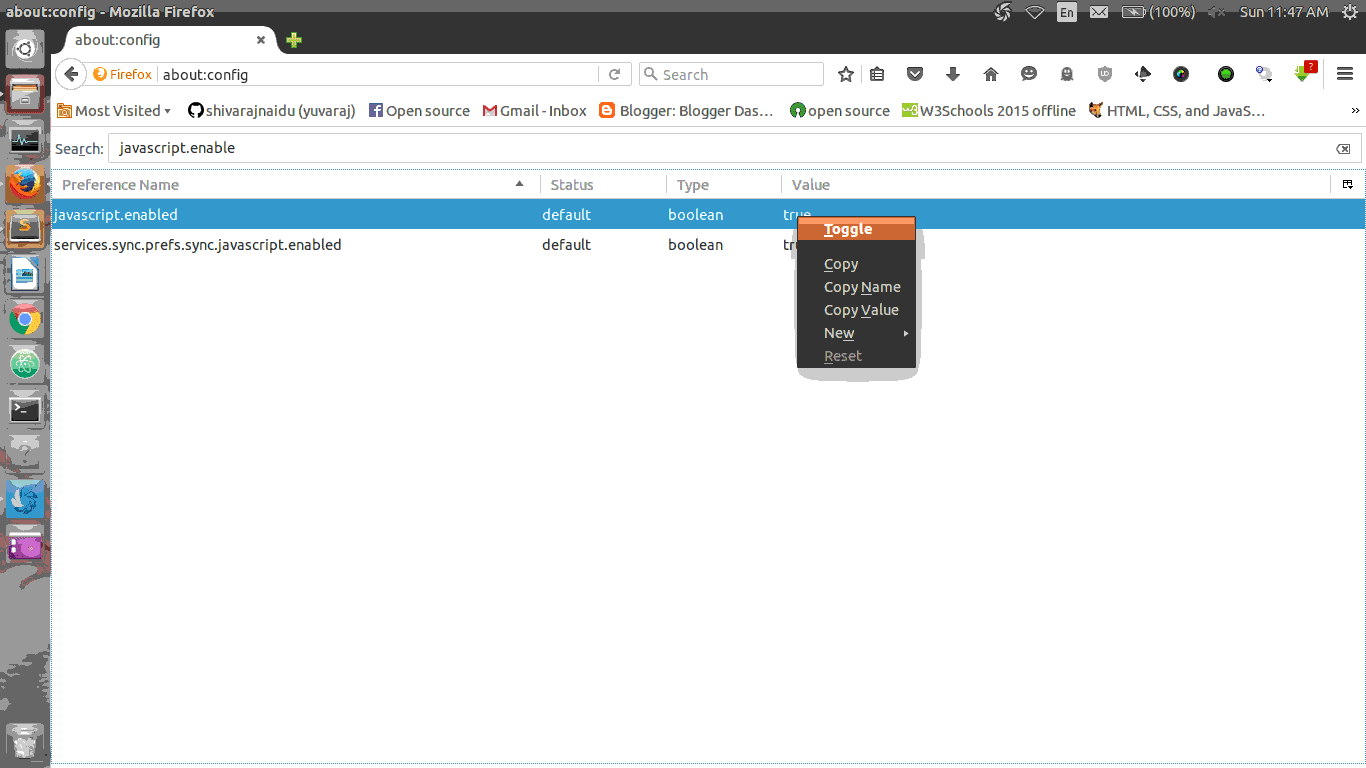
Now change the value of javascript.enabled to false (The default value is "true".. to change it to "false", Right click on it and select toggle option.)

To enable it again, toggle the value back to its default value.. (i.e) set the value as "true"

Disable JavaScript In Google Chrome

Step 1 :

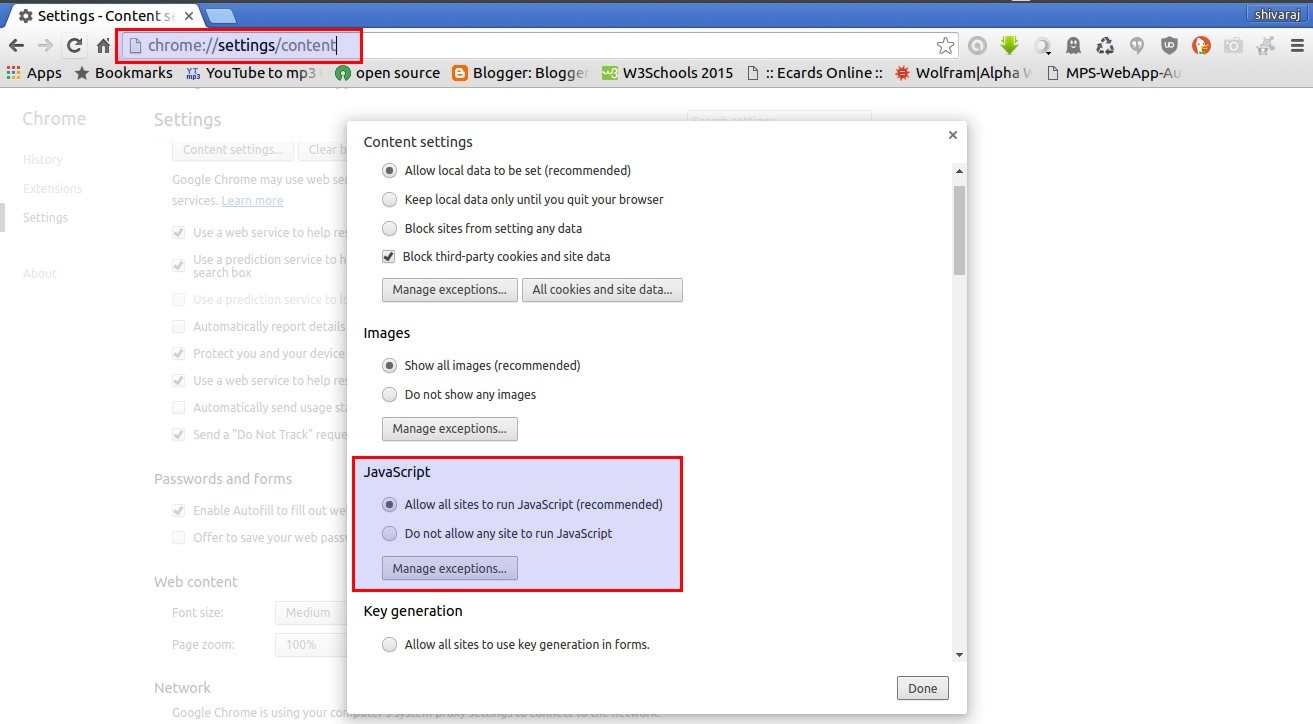
Open Browser Settings and then goto content options(through advace settings).. or (You can also directly access content settings simply , type chrome:settings/content in location bar and press "ENTER" button..)
Then look at there for javascript options..

Step 2 :

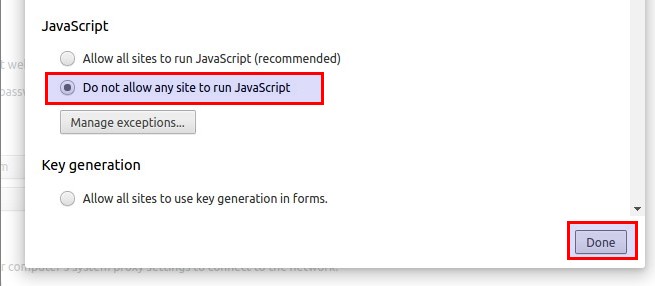
To disable JavaScript in your chrome browser.. Check the radio button named
"Do Not Allow Any Site To Run JavaScript"

Disable JavaScript In Opera Browser

Step 1 :

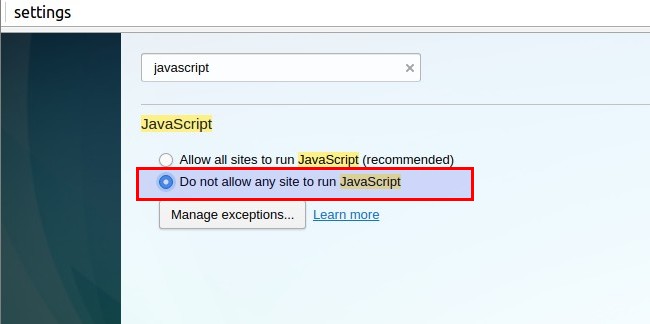
Open Browser Settings (You can also directly access browser settings simply , type chrome:settings in location bar and press "ENTER" button..) and then Type "javascript" in search box present in settings window..

Step 2 :

To disable JavaScript in your Opera web browser.. Check the radio button named
"Do Not Allow Any Site To Run JavaScript"

How to video for you...


Thursday, March 31, 2016

Fix 'Failed To Fetch' Error With Google Chrome On Ubuntu And It's Derivatives

Fix 'Failed To Fetch' Error With Google Chrome On Ubuntu And It's Derivatives


'Failed To Fetch' Error With Google Chrome

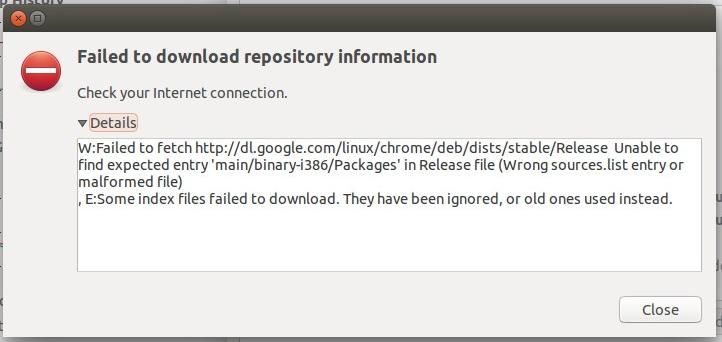
Recently, while updating your Ubuntu or Ubuntu based systems, you might have come across an update error that says:

Fetched 65.9 kB in 5min 48s (188 B/s) W: Failed to fetch http://dl.google.com/linux/chrome/deb/dists/stable/Release Unable to find expected entry 'main/binary-i386/Packages' in Release file (Wrong sources.list entry or malformed file) E: Some index files failed to download. They have been ignored, or old ones used instead.

error while updating google chrome on ubuntu 14.04

Don't feel alone. This is a common issue faced by many after Google Chrome has ended support for 32 bit Linux system. We already know about it. This change was supposed to impact only 32 bit Linux systems but it seems that even users running Ubuntu 14.04 or higher on a 64 bit systems are also affected by this change.
While this error is tiny, trivial, it is highly annoying. Good news is that it is really easy to get rid of this pain-in-neck error.

Fix Failed to fetch issue :

The problem here is that in the sources list entry, by default, it is expecting the 32 bit package. This sound weird but it's true.What we need to do here is to change the sources.list entry for Google Chrome and explicitly instruct it to get

What we need to do here is to change the sources.list entry for Google Chrome and explicitly instruct it to get 64 bit package. How to modify the sources.list, you may ask.

Well, it's quite easy to do that. It can be done entirely in command line itself, but keeping beginners in mind, I'll show you how to do it with a graphical text editor.


step 1

Open a terminal and use the command below:

sudo gedit /etc/apt/sources.list.d/google-chrome.list

This will open Gedit text editor and you'll see a file like this:


Step 2:

In here, all we need to do is to replace
" deb http://dl.google.com/linux/chrome/deb/ stable main " with the following line:

deb [arch=amd64] http://dl.google.com/linux/chrome/deb/ stable main

It should look like this now:


Step 3:

Save and close the file. Now run the update again using the command below:

sudo apt-get update

That's it.. You won't see the error again. Enjoy error-free updates now ☻


It's open source ....
     Love It ...!
          Share It...!
                  &
                    Enjoy It Guys...! ☺

Wednesday, March 9, 2016

Why Node.js

Why The Hell Would I Use Node.js? A Case-by-Case Tutorial 


Introduction

JavaScript’s rising popularity has brought with it a lot of changes, and the face of web development today is dramatically different. The things that we can do on the web nowadays with JavaScript running on the server, as well as in the browser, were hard to imagine just several years ago, or were encapsulated within sandboxed environments like Flash or Java Applets.
Before digging into Node.js, you might want to read up on the benefits of using JavaScript across the stack which unifies the language and data format (JSON), allowing you to optimally reuse developer resources. As this is more a benefit of JavaScript than Node.js specifically, we won’t discuss it much here. But it’s a key advantage to incorporating Node in your stack.
As Wikipedia states: “Node.js is a packaged compilation of Google’s V8 JavaScript engine, the libuv platform abstraction layer, and a core library, which is itself primarily written in JavaScript.” Beyond that, it’s worth noting that Ryan Dahl, the creator of Node.js, was aiming to create real-time websites with push capability, “inspired by applications like Gmail”. In Node.js, he gave developers a tool for working in the non-blocking, event-driven I/O paradigm.

In one sentence: Node.js shines in real-time web applications employing push technology over websockets. What is so revolutionary about that? Well, after over 20 years of stateless-web based on the stateless request-response paradigm, we finally have web applications with real-time, two-way connections, where both the client and server can initiate communication, allowing them to exchange data freely. This is in stark contrast to the typical web response paradigm, where the client always initiates communication. Additionally, it’s all based on the open web stack (HTML, CSS and JS) running over the standard port 80.
One might argue that we’ve had this for years in the form of Flash and Java Applets—but in reality, those were just sandboxed environments using the web as a transport protocol to be delivered to the client. Plus, they were run in isolation and often operated over non-standard ports, which may have required extra permissions and such.
With all of its advantages, Node.js now plays a critical role in the technology stack of many high-profile companies who depend on its unique benefits.
In this post, I’ll discuss not only how these advantages are accomplished, but also why you might want to use Node.js—and why not—using some of the classic web application models as examples.

How Does It Work?

The main idea of Node.js: use non-blocking, event-driven I/O to remain lightweight and efficient in the face of data-intensive real-time applications that run across distributed devices.
That’s a mouthful.
What it really means is that Node.js is not a silver-bullet new platform that will dominate the web development world. Instead, it’s a platform that fills a particular need. And understanding this is absolutely essential. You definitely don’t want to use Node.js for CPU-intensive operations; in fact, using it for heavy computation will annul nearly all of its advantages. Where Node really shines is in building fast, scalable network applications, as it’s capable of handling a huge number of simultaneous connections with high throughput, which equates to high scalability.
How it works under-the-hood is pretty interesting. Compared to traditional web-serving techniques where each connection (request) spawns a new thread, taking up system RAM and eventually maxing-out at the amount of RAM available, Node.js operates on a single-thread, using non-blocking I/O calls, allowing it to support tens of thousands of concurrent connections (held in the event loop).
A quick calculation: assuming that each thread potentially has an accompanying 2 MB of memory with it, running on a system with 8 GB of RAM puts us at a theoretical maximum of 4000 concurrent connections, plus the cost of context-switching between threads. That’s the scenario you typically deal with in traditional web-serving techniques. By avoiding all that, Node.js achieves scalability levels of over 1M concurrent connections (as a proof-of-concept).
There is, of course, the question of sharing a single thread between all clients requests, and it is a potential pitfall of writing Node.js applications. Firstly, heavy computation could choke up Node’s single thread and cause problems for all clients (more on this later) as incoming requests would be blocked until said computation was completed. Secondly, developers need to be really careful not to allow an exception bubbling up to the core (topmost) Node.js event loop, which will cause the Node.js instance to terminate (effectively crashing the program).
The technique used to avoid exceptions bubbling up to the surface is passing errors back to the caller as callback parameters (instead of throwing them, like in other environments). Even if some unhandled exception manages to bubble up, there are mutiple paradigms and tools available to monitor the Node process and perform the necessary recovery of a crashed instance (although you won’t be able to recover users’ sessions), the most common being the Forever module, or a different approach with external system tools upstart and monit.

NPM: The Node Package Manager

When discussing Node.js, one thing that definitely should not be omitted is built-in support for package management using the NPM tool that comes by default with every Node.js installation. The idea of NPM modules is quite similar to that of Ruby Gems: a set of publicly available, reusable components, available through easy installation via an online repository, with version and dependency management.
A full list of packaged modules can be found on the NPM website https://npmjs.org/ , or accessed using the NPM CLI tool that automatically gets installed with Node.js. The module ecosystem is open to all, and anyone can publish their own module that will be listed in the NPM repository. A brief introduction to NPM (a bit old, but still valid) can be found at http://howtonode.org/introduction-to-npm.
Some of the most popular NPM modules today are:
  • express - Express.js, a Sinatra-inspired web development framework for Node.js, and the de-facto standard for the majority of Node.js applications out there today.
  • connect - Connect is an extensible HTTP server framework for Node.js, providing a collection of high performance “plugins” known as middleware; serves as a base foundation for Express.
  • socket.io and sockjs - Server-side component of the two most common websockets components out there today.
  • Jade - One of the popular templating engines, inspired by HAML, a default in Express.js.
  • mongo and mongojs - MongoDB wrappers to provide the API for MongoDB object databases in Node.js.
  • redis - Redis client library.
  • coffee-script - CoffeeScript compiler that allows developers to write their Node.js programs using Coffee.
  • underscore (lodash, lazy) - The most popular utility library in JavaScript, packaged to be used with Node.js, as well as its two counterparts, which promise better performance by taking a slightly different implementation approach.
  • forever - Probably the most common utility for ensuring that a given node script runs continuously. Keeps your Node.js process up in production in the face of any unexpected failures.
The list goes on. There are tons of really useful packages out there, available to all (no offense to those that I’ve omitted here).

Examples of Where Node.js Should Be Used

CHAT

Chat is the most typical real-time, multi-user application. From IRC (back in the day), through many proprietary and open protocols running on non-standard ports, to the ability to implement everything today in Node.js with websockets running over the standard port 80.
The chat application is really the sweet-spot example for Node.js: it’s a lightweight, high traffic, data-intensive (but low processing/computation) application that runs across distributed devices. It’s also a great use-case for learning too, as it’s simple, yet it covers most of the paradigms you’ll ever use in a typical Node.js application.
Let’s try to depict how it works.
In the simplest example, we have a single chatroom on our website where people come and can exchange messages in one-to-many (actually all) fashion. For instance, say we have three people on the website all connected to our message board.
On the server-side, we have a simple Express.js application which implements two things: 1) a GET ‘/’ request handler which serves the webpage containing both a message board and a ‘Send’ button to initialize new message input, and 2) a websockets server that listens for new messages emitted by websocket clients.
On the client-side, we have an HTML page with a couple of handlers set up, one for the ‘Send’ button click event, which picks up the input message and sends it down the websocket, and another that listens for new incoming messages on the websockets client (i.e., messages sent by other users, which the server now wants the client to display).
When one of the clients posts a message, here’s what happens:
  • Browser catches the ‘Send’ button click through a JavaScript handler, picks up the value from the input field (i.e., the message text), and emits a websocket message using the websocket client connected to our server (initialized on web page initialization).
  • Server-side component of the websocket connection receives the message and forwards it to all other connected clients using the broadcast method.
  • All clients receive the new message as a push message via a websockets client-side component running within the web page. They then pick up the message content and update the web page in-place by appending the new message to the board.
This is the simplest example. For a more robust solution, you might use a simple cache based on the Redis store. Or in an even more advanced solution, a message queue to handle the routing of messages to clients and a more robust delivery mechanism which may cover for temporary connection losses or storing messages for registered clients while they’re offline. But regardless of the improvements that you make, Node.js will still be operating under the same basic principles: reacting to events, handling many concurrent connections, and maintaining fluidity in the user experience.

API ON TOP OF AN OBJECT DB

Although Node.js really shines with real-time applications, it’s quite a natural fit for exposing the data from object DBs (e.g. MongoDB). JSON stored data allow Node.js to function without the impedance mismatch and data conversion.
For instance, if you’re using Rails, you would convert from JSON to binary models, then expose them back as JSON over the HTTP when the data is consumed by Backbone.js, Angular.js, etc., or even plain jQuery AJAX calls. With Node.js, you can simply expose your JSON objects with a REST API for the client to consume. Additionally, you don’t need to worry about converting between JSON and whatever else when reading or writing from your database (if you’re using MongoDB). In sum, you can avoid the need for multiple conversions by using a uniform data serialization format across the client, server, and database.

QUEUED INPUTS

If you’re receiving a high amount of concurrent data, your database can become a bottleneck. As depicted above, Node.js can easily handle the concurrent connections themselves. But because database access is a blocking operation (in this case), we run into trouble. The solution is to acknowledge the client’s behavior before the data is truly written to the database.
With that approach, the system maintains its responsiveness under a heavy load, which is particularly useful when the client doesn’t need firm confirmation of a the successful data write. Typical examples include: the logging or writing of user-tracking data, processed in batches and not used until a later time; as well as operations that don’t need to be reflected instantly (like updating a ‘Likes’ count on Facebook) where eventual consistency (so often used in NoSQL world) is acceptable.
Data gets queued through some kind of caching or message queuing infrastructure (e.g., RabbitMQ, ZeroMQ) and digested by a separate database batch-write process, or computation intensive processing backend services, written in a better performing platform for such tasks. Similar behavior can be implemented with other languages/frameworks, but not on the same hardware, with the same high, maintained throughput. In short: with Node, you can push the database writes off to the side and deal with them later, proceeding as if they succeeded.

DATA STREAMING

In more traditional web platforms, HTTP requests and responses are treated like isolated event; in fact, they’re actually streams. This observation can be utilized in Node.js to build some cool features. For example, it’s possible to process files while they’re still being uploaded, as the data comes in through a stream and we can process it in an online fashion. This could be done for real-time audio or video encoding, and proxying between different data sources (see next section).

PROXY

Node.js is easily employed as a server-side proxy where it can handle a large amount of simultaneous connections in a non-blocking manner. It’s especially useful for proxying different services with different response times, or collecting data from multiple source points.
An example: consider a server-side application communicating with third-party resources, pulling in data from different sources, or storing assets like images and videos to third-party cloud services.
Although dedicated proxy servers do exist, using Node instead might be helpful if your proxying infrastructure is non-existent or if you need a solution for local development. By this, I mean that you could build a client-side app with a Node.js development server for assets and proxying/stubbing API requests, while in production you’d handle such interactions with a dedicated proxy service (nginx, HAProxy, etc.).

BROKERAGE - STOCK TRADER’S DASHBOARD

Let’s get back to the application level. Another example where desktop software dominates, but could be easily replaced with a real-time web solution is brokers’ trading software, used to track stocks prices, perform calculations/technical analysis, and create graphs/charts.
Switching to a real-time web-based solution would allow brokers to easily switch workstations or working places. Soon, we might start seeing them on the beach in Florida.. or Ibiza.. or Bali.

APPLICATION MONITORING DASHBOARD

Another common use-case in which Node-with-web-sockets fits perfectly: tracking website visitors and visualizing their interactions in real-time. (If you’re interested, this idea is already being productized by Hummingbird.)
You could be gathering real-time stats from your user, or even moving it to the next level by introducing targeted interactions with your visitors by opening a communication channel when they reach a specific point in your funnel. (If you’re interested, this idea is already being productized by CANDDi.)
Imagine how you could improve your business if you knew what your visitors were doing in real-time—if you could visualize their interactions. With the real-time, two-way sockets of Node.js, now you can.

SYSTEM MONITORING DASHBOARD

Now, let’s visit the infrastructure side of things. Imagine, for example, an SaaS provider that wants to offer its users a service-monitoring page (e.g., GitHub’s status page). With the Node.js event-loop, we can create a powerful web-based dashboard that checks the services’ statuses in an asynchronous manner and pushes data to clients using websockets.
Both internal (intra-company) and public services’ statuses can be reported live and in real-time using this technology. Push that idea a little further and try to imagine a Network Operations Center (NOC) monitoring applications in a telecommunications operator, cloud/network/hosting provider, or some financial institution, all run on the open web stack backed by Node.js and websockets instead of Java and/or Java Applets.
Note: Don't try to build hard real-time systems in Node (i.e., systems requiring consistent response times). Erlang is probably a better choice for that class of application.

Where Node.js Can Be Used

SERVER-SIDE WEB APPLICATIONS

Node.js with Express.js can also be used to create classic web applications on the server-side. However, while possible, this request-response paradigm in which Node.js would be carrying around rendered HTML is not the most typical use-case. There are arguments to be made for and against this approach. Here are some facts to consider:
Pros:
  • If your application doesn’t have any CPU intensive computation, you can build it in Javascript top-to-bottom, even down to the database level if you use JSON storage Object DB like MongoDB. This eases development (including hiring) significantly.
  • Crawlers receive a fully-rendered HTML response, which is far more SEO-friendly than, say, a Single Page Application or a websockets app run on top of Node.js.
Cons:
  • Any CPU intensive computation will block Node.js responsiveness, so a threaded platform is a better approach. Alternatively, you could try scaling out the computation 1.
  • Using Node.js with a relational database is still quite a pain (see below for more detail). Do yourself a favour and pick up any other environment like Rails, Django, or ASP.Net MVC if you’re trying to perform relational operations.

Where Node.js Shouldn’t Be Used

SERVER-SIDE WEB APPLICATION W/ A RELATIONAL DB BEHIND

Comparing Node.js with Express.js against Ruby on Rails, for example, there is a clean decision in favour of the latter when it comes to relational data access.
Relational DB tools for Node.js are still in their early stages; they’re rather immature and not as pleasant to work with. On the other hand, Rails automagically provides data access setup right out of the box together with DB schema migrations support tools and other Gems (pun intended). Rails and its peer frameworks have mature and proven Active Record or Data Mapper data access layer implementations, which you’ll sorely miss if you try to replicate them in pure JavaScript.2
Still, if you’re really inclined to remain JS all-the-way (and ready to pull out some of your hair), keep an eye on Sequelize and Node ORM2—both are still immature, but they may eventually catch up.

HEAVY SERVER-SIDE COMPUTATION/PROCESSING

When it comes to heavy computation, Node.js is not the best platform around. No, you definitely don’t want to build a Fibonacci computation server in Node.js. In general, any CPU intensive operation annuls all the throughput benefits Node offers with its event-driven, non-blocking I/O model because any incoming requests will be blocked while the thread is occupied with your number-crunching.
As stated previously, Node.js is single-threaded and uses only a single CPU core. When it comes to adding concurrency on a multi-core server, there is some work being done by the Node core team in the form of a cluster module [ref: http://nodejs.org/api/cluster.html]. You can also run several Node.js server instances pretty easily behind a reverse proxy via nginx.
With clustering, you should still offload all heavy computation to background processes written in a more appropriate environment for that, and having them communicate via a message queue server like RabbitMQ.
Even though your background processing might be run on the same server initially, such an approach has the potential for very high scalability. Those background processing services could be easily distributed out to separate worker servers without the need to configure the loads of front-facing web servers.
Of course, you’d use the same approach on other platforms too, but with Node.js you get that high reqs/sec throughput we’ve talked about, as each request is a small task handled very quickly and efficiently.

Conclusion

We’ve discussed Node.js from theory to practice, beginning with its goals and ambitions, and ending with its sweet spots and pitfalls. When people run into problems with Node, it almost always boils down to the fact that blocking operations are the root of all evil—99% of Node misuses come as a direct consequence.
Remember: Node.js was never created to solve the compute scaling problem. It was created to solve the I/O scaling problem, which it does really well.
Why use Node.js? If your use case does not contain CPU intensive operations nor access any blocking resources, you can exploit the benefits of Node.js and enjoy fast and scalable network applications. Welcome to the real-time web.
  1. An alternative to these CPU intensive computations is to create a highly scalable MQ-backed environment with back-end processing to keep Node as a front-facing 'clerk' to handle client requests asynchronously.
  2. It’s possible and not uncommon to use Node solely as a front-end, while keeping your Rails back-end and its easy-access to a relational DB.

Source: TOPTAL

Saturday, November 28, 2015

NetSurf : An Extremely Fast and Light weight Web Browser

NetSurf

An Extremely Fast and Light weight Web Browser

NetSurf is a free, open source web browser. It is written in C and released under the GNU Public Licence version 2.
NetSurf has its own layout and rendering engine entirely written from scratch. It is small and capable of handling many of the web standards in use today.

Whether you want to check your webmail, read the news or post to discussion forums, NetSurf is your lightweight gateway to the world wide web. Actively developed, NetSurf is continually evolving and improving.

Also Read: How to get started with Linux: A beginner's guide

Why choose NetSurf?

  • Speed
  • Simple interface
  • Light weight
  • Portable
  • Standards compliant
See More At : www.netsurf-browser.org

Project Goals

  • Adhere to the standards
  • Superior user experience
  • Keep NetSurf small
  • Portability
  • Modularity
  • Have fun with Learning By contributing
See Brief Design Goals at : Net Surf ProjectGoals

Ports & Availability

NetSurf 3.3 features

  • Web standards: HTML 4.01 and CSS 2.1
  • Image formats including: PNG, GIF, JPEG, SVG, and BMP
  • HTTPS for secure online transactions
  • Unicode text
  • Web page thumb-nailing
  • Local history trees
  • Global history
  • Hot-list manager (bookmarks)
  • Cookie manager
  • URL completion
  • Text selection
  • Scale view
  • Search-as-you-type text search highlighting
  • Save pages complete with images
  • Fast, lightweight layout and rendering engine

Also Read: 47 cool browser hacks

Installation Instructions:

For Debian Based Linux :

Also Read: The only remaining barrier to entry for Linux

step 1 : Download *.deb binary file of Net Surf Browser to Downloads ( ~/Downloads) Folder .
step 2 : Now open command line & navigate into downloads folder

cd ~/Downloads
step 3 : then install using dpkg command
sudo dpkg -i package_name.deb

Note : In above command (sudo dpkg -i package_name.deb) replace package_name by downloaded package name .


If you encounter any problems during installation Run below commands:
sudo apt-get update && sudo apt-get -f install

if you have further doubt in installation see this link.

Installation procedure for other os :see official documentation .


Also Read: have a fun with Linux vs Windows vs Mac

Related Links :


Saturday, May 16, 2015

47 Keyboard Shortcuts That Work in All Web Browsers

Short-cuts are very useful and convenient for our day to day computer use.....

and we are using different browsers(firefox, chrome, opera etc...),  but they are all share some short-cuts commonly between them...


Each major web browser shares a large number of keyboard shortcuts in common. Whether you’re using Mozilla Firefox, Google Chrome, Internet Explorer, Apple Safari, or Opera – these keyboard shortcuts will work in your browser.


Each browser also has some of its own, browser-specific shortcuts, but learning the ones they have in common will serve you well as you switch between different browsers and computers. This list includes a few mouse actions, too.


Tabs

Ctrl+1-8 – Switch to the specified tab, counting from the left.

Ctrl+9 – Switch to the last tab.


Ctrl+Tab – Switch to the next tab – in other words, the tab on the right. (Ctrl+Page Up also works, but not in Internet Explorer.)

Ctrl+Shift+Tab – Switch to the previous tab – in other words, the tab on the left. (Ctrl+Page Down also works, but not in Internet Explorer.)

Ctrl+W, Ctrl+F4 – Close the current tab.

Ctrl+Shift+T – Reopen the last closed tab.

Read more at How To Geek .....


 you may also like to read...

Group Apps In Unity Launcher With LauncherFolders 

Chrome OS Look-Alike Linux Distro Chromixium